


Apr 10, 2011
Registry editor (Regedit) settings for notepad++ context menu.
Settings:
A] To Visible/Invisible Icon in context menu -
1] go to HKEY_CLASSES_ROOT\CLSID\{00F3C2EC-A6EE-11DE-A03A-EF8F55D89593}\Settings
2] modify ShowIcon value to 0 (zero) for invisible and 1 for visible.
B] To modify context text
1] go to HKEY_CLASSES_ROOT\CLSID\{00F3C2EC-A6EE-11DE-A03A-EF8F55D89593}\Settings
2] modify Title value to text you want (e.g. - edit with npp++)
Download application for this settings
Download
Jan 10, 2011
Just few minutes back while I was playing with registry, found some tricky values for notepad++ shell extension (context menu icon and title).
Then wrote little application to modify them.
Download : Zip

Registry settings for this will post later..
Oct 27, 2008
When AutoPlay is activated n our Data CD/DVD or flash drives inserted, Windows will execute an Applications which is configured in autorun.inf. Read Wiki for more information of Autorun.inf
Mostly all viruses travels from autorun to system directory or drive
Here ill tell you how to block specific files from autoplay instead of Disabling Autoplay system.
Settings:
1] Run > regedit
2] go to HKEY_LOCAL_MACHINE\SOFTWARE\Microsoft\Windows\CurrentVersion\Explorer\AutoplayHandlers\CancelAutoplay\Files
3] Add New String value and name it with application name which you want to block.
4] e.g.- Some bad coders use shell32.exe (system contains shell32.dll, see the difference between .exe n .dll) to execute virus from autorun.inf
[note:- shell32.exe, run32.exe, ntdetect1.exe these used to run virus cause system contains this named dll]
5] so to block shell32.exe from autorun i'll add new string value - name 'shell32.exe'
6] to block any other applications which contains 32.exe, so ill add '*32.exe'
7] you can block any file formats, e.g- vb scripts like 'killtask.vbs'
8] or you can set '*fun*' something like for blocking fun.exe
9] read by default string names to better understand..
Done. :)
Oct 16, 2008
Two days ago i wrote another program for adding my favorite folder at drives context menu in My Computer.
This application allows you to add your favorite or working folder to drives context menu..
You can Set/Update/Remove this context menu easily using this application..
Useful for lazy people like me :)

Download:
AddContextDrive.zip (mirror1)
Oct 8, 2008
Most of all viruses first blocks your Registry and Task Manager, So you can not remove viruses manually from start up and also you can not kill running virus process, so you need to Enable Task manager and Registry to kill process and remove from start up..
Last night i just wrote this little application for my handy use when playing with virus, hope its useful for everyone :)
This application is allows you to Enable/Disable your registry Editor, and also allows you to Enable/Disable your Task Manager (User/admin)..
Download:
Download (mirror1)
Sep 30, 2008
Last night i wrote an application to remove files context menu and Property tab of Quick Heal scan..
Last month I'd post about registry settings of quick heal context menu and property tab, n by using this hacks i wrote this application to easily enable and disable the context menus n property tabs
Features:
1] Disable / Enable Quick Heal context menu of files
2] Disable / Enable Quick Heal context menu of folders and drives
3] Disable / Enable Quick Heal property tab of files
Download this by using below links:
1] Download - Mirror 1
For uninstall Quick Heal read this post
Sep 18, 2008
This setting allows you to Remove 'sendto' option from right-click menu (context menu).
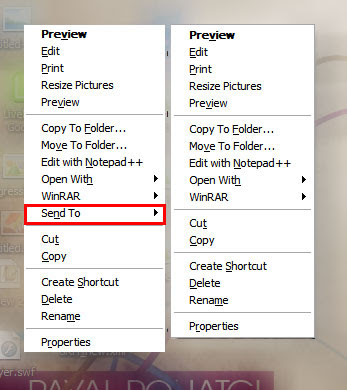
1] Run > Regedit > hit Enter
2] Registry > My Computer > HKEY_CLASSES_ROOT > select AllFilesystemObjects
3] AllFilesystemObjects > shellex > ContextMenuHandlers
4] ContextMenuHandlers > select Send To
5] now right side pane double click on '(Default)'
6] Add '-' (minus sign) in front of {7BA4C740-9E81-11CF-99D3-00AA004AE837}
7] like this ' -{7BA4C740-9E81-11CF-99D3-00AA004AE837}'
8] Now refresh your Desktop n check right click menu.. :)
Sep 6, 2008
I have started blogging from last month and i got more than 22 hits only for 'Remove/uninstall quick heal from registry' by Google search hit..
So i want post something about 'How to remove or uninstall Quick Heal from your PC?'
Quick Heal trial version runs only for 30 days, after 30days goes all function scanning functions OFF but runs only Online Protection.. After evaluation period you can't turn ON all other protection.. so you need register and activate your account or uninstall quick heal from your PC.
Quick heal have one bug, that is when you uninstall quick heal from your computer then automatically clean its registry from your computer..
So you can use trial version again for 30 days.. means you can use quick heal for unlimited period..
Now ill tell you how to remove quick heal and use unlimited..
First: How to Remove or Uninstall Quick Heal from Your PC ???
1] Go to Start> Control Panel
2] Control Panel> select Add or Remove Programs (hit Enter or Double click to open it)
3] Select Quick Heal Total Security from list..
4] Press Change/Remove button to remove Quick Heal from your PC..
5] Yes to Proceed
6] Select check mark for Remove report files
7] Restart your computer to completely remove quick heal (Restart is must)
After restart:
Run your Setup of Quick Heal form your PC or Download Latest version of Quick Heal from web to your PC.
Install Completely Quick Heal and it runs with all protection for 30 days again..
After 30 days do same above process n use quick heal for 30 days again...
Removing Quick Heal from Registry is not necessary..
if incase you want to remove Quick Heal from your Registry follow these 3 steps:
Open registry editor and then
1] go to HKEY_LOCAL_MACHINE > SOFTWARE > Quick Heal
and delete Complete Quick Heal Key..
2] HKEY_USERS > .DEFAULT > Software > Quick Heal and delete this key too..
3] HKEY_USERS > S-1-5-18> Software > Quick Heal and delete this key too..
And for remove Quick Heal from Right Click, Read This Post
Update : 28.2.09
Download Quick Heal uninstaller from Quick heal esupport . This Application will clean all registry n quick heal system files.
