


Oct 27, 2008
When AutoPlay is activated n our Data CD/DVD or flash drives inserted, Windows will execute an Applications which is configured in autorun.inf. Read Wiki for more information of Autorun.inf
Mostly all viruses travels from autorun to system directory or drive
Here ill tell you how to block specific files from autoplay instead of Disabling Autoplay system.
Settings:
1] Run > regedit
2] go to HKEY_LOCAL_MACHINE\SOFTWARE\Microsoft\Windows\CurrentVersion\Explorer\AutoplayHandlers\CancelAutoplay\Files
3] Add New String value and name it with application name which you want to block.
4] e.g.- Some bad coders use shell32.exe (system contains shell32.dll, see the difference between .exe n .dll) to execute virus from autorun.inf
[note:- shell32.exe, run32.exe, ntdetect1.exe these used to run virus cause system contains this named dll]
5] so to block shell32.exe from autorun i'll add new string value - name 'shell32.exe'
6] to block any other applications which contains 32.exe, so ill add '*32.exe'
7] you can block any file formats, e.g- vb scripts like 'killtask.vbs'
8] or you can set '*fun*' something like for blocking fun.exe
9] read by default string names to better understand..
Done. :)
Sep 18, 2008
This setting allows you to Remove 'sendto' option from right-click menu (context menu).
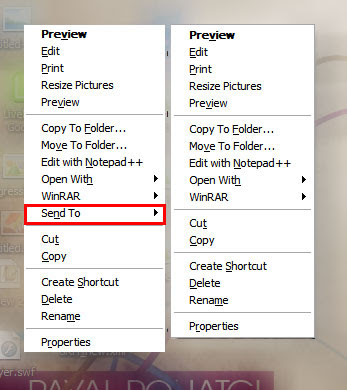
1] Run > Regedit > hit Enter
2] Registry > My Computer > HKEY_CLASSES_ROOT > select AllFilesystemObjects
3] AllFilesystemObjects > shellex > ContextMenuHandlers
4] ContextMenuHandlers > select Send To
5] now right side pane double click on '(Default)'
6] Add '-' (minus sign) in front of {7BA4C740-9E81-11CF-99D3-00AA004AE837}
7] like this ' -{7BA4C740-9E81-11CF-99D3-00AA004AE837}'
8] Now refresh your Desktop n check right click menu.. :)
Sep 3, 2008
World's ever super n simple trick to hide n protect your files...
5 comments Posted by mad1421 at 2:17 AMEveryone wants to protect our private data files like photos, video files, docs, letters and many other type of files from friends, hackers n any other peoples who want to get your secrets...
Many peoples facing another problem on web that is file sharing..
If you send your pic to friend it got many others too..
Also many free web host user always face one problem that is they cant share mp3 files n video files on free web host..
Im always using my one favorite trick to hide n protect my files from friends, colleagues..
i also stores my mp3, video files on my free web host..
I wana share this trick with you..
Lets start... This two files i wanna protect from my colleagues...
so now ill explain how to protects these two files in a just 5 seconds..
First you need to set some parameters in Folders options in explorer.
1] Open My Computer
2] go to Tools > Folder Options > View
3] and Remove the check mark of 'Hide extensions for known file types'
Like in below image..
4] Now select file which you want to hide or protect
5] Press F2 or rename from right click menu...
6] if you want to hide an image then rename your image files extension as .exe instead of .jpg
See what i did.. [ i changed 'myPhoto.jpg' file as 'myPhoto.exe' and 'love.txt' as 'love.jpg']
This is the my real trick to hide n protect files.
obviously changing extensions means changing properties of files too..
so now our file changed properties n context menus.. Now only you knows that what is the real extension of our files, but no one other is know that whats the real extension of the files.. so whenever others got your files they will try to double click to open or they will try to open those files in associated programs to open..
If they double click on you files, they got an error n shockd cause if you used .exe extension then it show error like
and txt to jpg if someone got your renamed file then mostly double click or hit enter for open file.. so when you want to protect your files then simply rename n change extension..
You can use extensions like .exe, .dll, .mp3, .avi etc for images
and .exe, .dll, .jpg, .bmp, .gif, .png etc for text files
and if you wanna upload your mp3 n video files on free web host
rename your files as .txt, .htm, .html, .sql, .tpl, .php, .jpg, .bmp n many more supported extensions of your host, after download rename n your exteions original
This is just simple trick to hide n protect files..
If you like this my simple, feel free to comment or ask any queries..
and if you want to get these tricks in your inbox just subscribe my RSS
