


Oct 16, 2008
Two days ago i wrote another program for adding my favorite folder at drives context menu in My Computer.
This application allows you to add your favorite or working folder to drives context menu..
You can Set/Update/Remove this context menu easily using this application..
Useful for lazy people like me :)

Download:
AddContextDrive.zip (mirror1)
Sep 18, 2008
This setting allows you to Remove 'sendto' option from right-click menu (context menu).
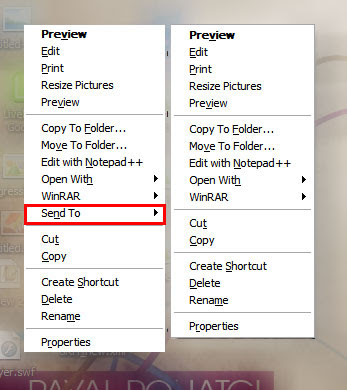
1] Run > Regedit > hit Enter
2] Registry > My Computer > HKEY_CLASSES_ROOT > select AllFilesystemObjects
3] AllFilesystemObjects > shellex > ContextMenuHandlers
4] ContextMenuHandlers > select Send To
5] now right side pane double click on '(Default)'
6] Add '-' (minus sign) in front of {7BA4C740-9E81-11CF-99D3-00AA004AE837}
7] like this ' -{7BA4C740-9E81-11CF-99D3-00AA004AE837}'
8] Now refresh your Desktop n check right click menu.. :)
Aug 21, 2008
Everybody has own custom folder in his computer to save, collect, work, music and for anything else, we use one or few more folder always for whatever we save or work...
So i wanna tell you one trick for 'How to add our favorite folder in SendTo menu'
There is no any trick in registry to add this context menu.. :-)
We just need to add shortcut of our folder in users SendTo shell folder..
Lets Start,
Settings:
1] go to Start> Run
2] Enter '%USERPROFILE%\SendTo' and hit Enter...
3] Then right click in anywhere in blank space in this folder...
4] Add new shortcut from New menu
5] It brings 'create shortcut' window...
6] browse in select your folder which you want in SendTo.. n Next
7] Name it what u want and press finish
8] Now select your shortcut folder > Right click > Properties
9] select shortcut tab, and 'change icon' for this shortcut folder...
10] Refresh your desktop and check your SendTo menu... :-)
[Note: SendTo menu only copy your files n folders, never move your file]
